

China (中国) — Passport
China (中国) · Passport
Specifications
| Country | China (中国) |
|---|---|
| Document type | Passport |
| Passport / visa picture size | Width: 33 mm, Height: 48 mm |
| Aspect ratio | 11:16 (33 × 48 mm) |
| Resolution (DPI) | 600 |
| Required file size (digital) | — |
| Head in photo | Head must be between 70 to 80 % of the photograph from the bottom of the chin to the top of the head |
| Background color | White — plain and evenly lit unless your issuer specifies a different tone. |
| Printable photo | Yes |
| Digital photo for online submission | Yes |
| Digital photo size (pixels) | Width: 385 px, Height: 560 px |
| Photo paper type | glossy |
Official Source
National Immigration Administration (China) — 出入境证件办理FAQ
Bullets are grouped from this country’s requirement text and spec fields. If a topic has no matching lines in our data, we show common international-style guidance—always confirm with your issuer.
1.Photo basics & quality
- Final print size for this preset: 11:16 (33 × 48 mm).
- 总体要求 申请人须提交6个月内纸质近照2张及同版数字照片。背景为白色。须包括申请人整个面部和头部。面部或背景无阴影。纸质照片必须由照相馆冲洗或使用专业照片打印纸打印。不得对照片进行修改,不得使用合成照片。数字照片文件须为JPEG格式,文件大小在30K到80K字节之间。如照片不符合要求,须重新提交。 面部要求 表情自然,双眼睁开,全部面部特征清晰可见;可佩带眼镜,但镜片不得有颜色,不得因闪光、阴影或镜架造成眼睛轮廓模糊;可佩带助听器或类似物品。 头饰 不得戴帽子或头巾等饰品,如因宗教原因不得不戴,须确保其不遮挡申请人整个面部。 数字照片提供方式(选择其一) 一、登录中国领事服务网(https://cs.mfa.gov.cn/),使用海外护照在线预约申请系统提前上传、检验数字照片。 二、将数字照片刻录在光盘上,连同其他申请材料递交到使领馆。 三、如使领馆办证大厅提供现场照相服务(仅限个别有条件馆),由现场照相点协助提供电子照片。
- 照片尺寸 为宽33mm,高48mm, 其中头部宽度 在15mm至22mm之间 头部高度(从下巴至头顶) 在28mm至33mm之间, 头顶至相片上边距离 在3mm至5mm之间, 人脸下颚以下到图像下边沿 高度不小于7mm。
- Always confirm the latest rules with the official issuing authority or online application portal before you submit.
- Dimensions for this preset: 33 × 48 mm (11:16 (33 × 48 mm)).
- Suggested print resolution: 600 DPI (confirm with your issuer).
- Typical digital dimensions when specified: 385 × 560 px (confirm upload requirements).
- A printable physical photo may be required for this document type (when applicable).
- Online submission with a digital file may be required (check the current application flow).
- Photo paper when printing: glossy.
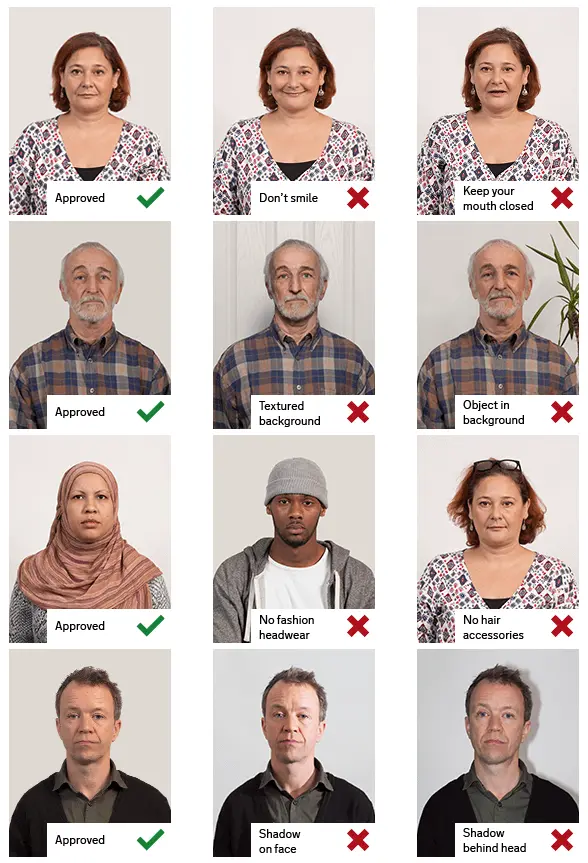
2.Pose & expression
- Head size in frame: Head must be between 70 to 80 % of the photograph from the bottom of the chin to the top of the head
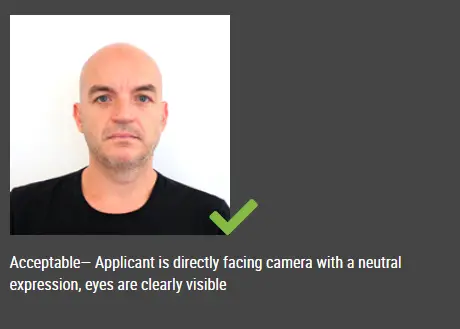
3.Attire & accessoriesInternational standards
- Everyday clothing; no uniform or uniform-like outfit unless your issuer allows it.
- Follow official rules for glasses, hats, and religious or medical head coverings—many passport programs require removing glasses.
- Keep the face unobstructed (hair off the eyes unless your authority says otherwise).
4.Lighting & background
- Background (summary): White — plain and evenly lit unless your issuer specifies a different tone.
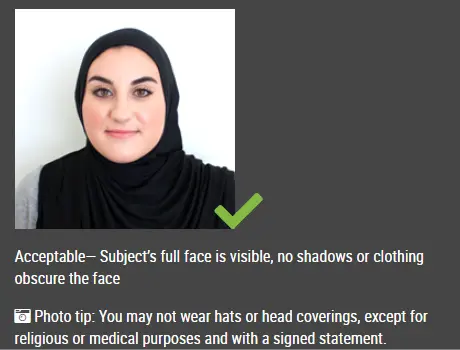
Visual guide
Illustrative reference photos served from a third-party CDN. Use only as informal guidance; follow your official instructions.

How an online passport photo generator typically works
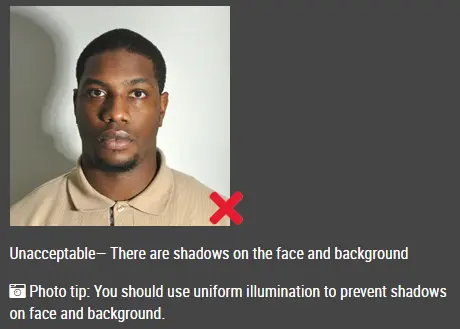
Avoid heavy shadows on the face and background
Even lighting and a clear, frontal face
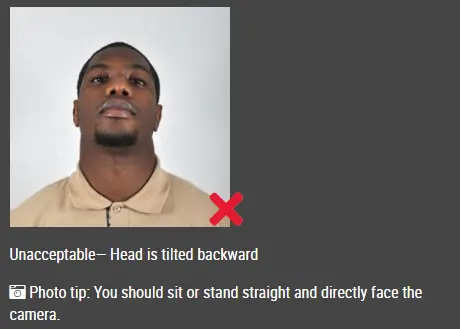
Head should not be tilted or turned away from the camera
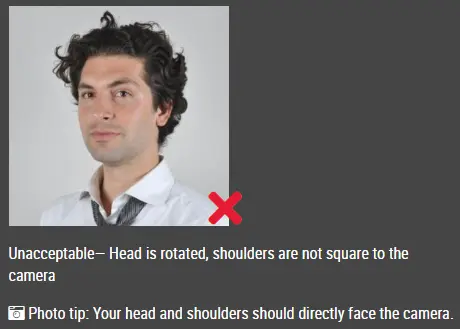
Keep the head straight; do not rotate the face
Face the camera straight on with shoulders visible
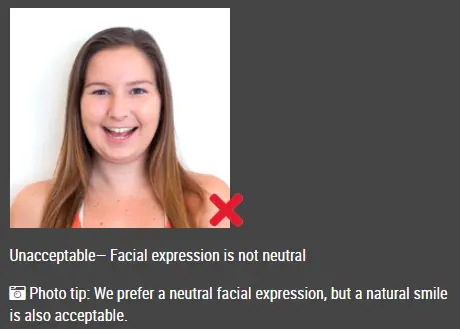
Avoid exaggerated smiles or an open mouth when a neutral look is required
Good and bad sizing / framing examples
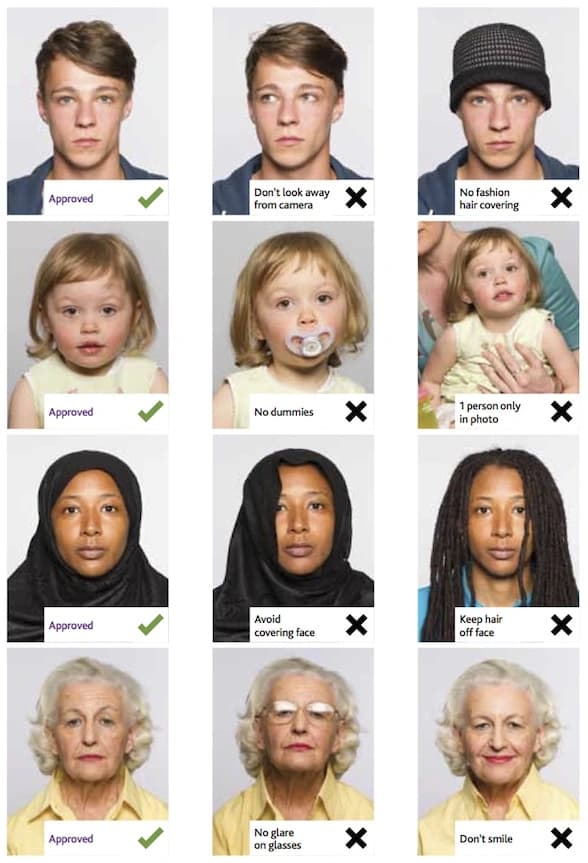
Printed photo strips (layout reference)
How to make this photo
1.Step 1: Use a digital camera or a smartphone
- —Find someone to take the photo for you and selfie photo is not acceptable for passport photo application. If you have a tripod, use it. A tripod will make it easier to keep the camera steady and level. The distance of the person to the camera should be around 1 meter.
2.Step 2: Find a venue with good lighting
- —When taking photo, you should face the light, such as a nice bright window or the door. This can provide even lighting to avoid shadows on the face and background. The face must be evenly lit. There should be no shadows and glares on the face.
- —Note: A simple wall is fine; you can tidy or replace the background while editing.
3.Step 3: Wear properly for your passport photo
- —Do not wear uniforms. Wear regular street clothes in your photo.
- —Do not wear eyeglasses. If you wear glasses, sunglasses, or tinted glasses, take them off for your passport photo.
- —Your face must still be fully visible. Don’t let your hair drape over your face and obscure your eyes. If you have very long bangs that cover your eyebrows, you should pin them back with bobby pins. It’s best if your ears show, as well, but that won’t cause your photo to be rejected.
- —No hats are allowed in passport photos unless it is religious headgear such as a headscarf or yarmulke that you wear every day.
4.Step 4: Pose for a passport
- —Look straight towards the camera with face straight on. Head should not be tilted or rotated.
- —Both ears showing or both edges of the face visible if hair covers the ears.
- —Shoulders should be visible, and there should be enough space around the head for cropping the photo.
- —Position the camera in the same height as the head.
5.Step 5: Have a neutral facial expression
- —You can smile in your passport photos, but the government prefers that you have a neutral facial expression.
- —Smiling or having your mouth open is usually not acceptable, especially under the new international passport rules.
- —Online Passport Photo Generator
Reference summary aligned with common third-party requirement listings. Always verify against the official embassy or visa center before you submit.