

United Kingdom — UK Bus Pass / Travel Pass
United Kingdom · UK Bus Pass / Travel Pass
Specifications
| Country | United Kingdom |
|---|---|
| Document type | UK Bus Pass / Travel Pass |
| Passport / visa picture size | Width: 35 mm, Height: 45 mm |
| Aspect ratio | 7:9 (35 × 45 mm) |
| Resolution (DPI) | 600 |
| Required file size (digital) | 50 KB – 250 KB (typical online spec; confirm portal) |
| Head in photo | Crown to chin must be 29–34 mm within the 45 mm print (about 64–76% of frame height from the top when your crown sits near the top of the crop). |
| Background color | Plain cream or light grey, evenly lit — no shadows on your face or behind you (Midlothian Council / UK travel pass). |
| Printable photo | Yes |
| Digital photo for online submission | Yes |
| Digital photo size (pixels) | Width: 450 px, Height: 600 px |
| Photo paper type | matte |
FAQ
Bullets are grouped from this country’s requirement text and spec fields. If a topic has no matching lines in our data, we show common international-style guidance—always confirm with your issuer.
1.Photo basics & quality
- This preset follows Midlothian Council’s published travel pass photo rules (35 × 45 mm print, cream/light grey background, 29–34 mm crown-to-chin). Other UK authorities often match these — still read your own application.
- Digital for this preset: JPEG, minimum 450 × 600 px; export targets roughly 50–250 KB for typical online uploads — confirm your portal.
- Must not be a cropped enlargement from a tiny face in a wide shot; no heavy beauty filters or edits that change your appearance.
- For physical prints: use good-quality photographic paper when your issuer asks for a print; check name-on-back rules.
- Always verify the latest wording with your council or card issuer.
- Dimensions for this preset: 35 × 45 mm (7:9 (35 × 45 mm)).
- Suggested print resolution: 600 DPI (confirm with your issuer).
- Typical digital file size when specified: 50–250 KB (portal rules may differ).
- Typical digital dimensions when specified: 450 × 600 px (confirm upload requirements).
- A printable physical photo may be required for this document type (when applicable).
- Online submission with a digital file may be required (check the current application flow).
- Photo paper when printing: matte.
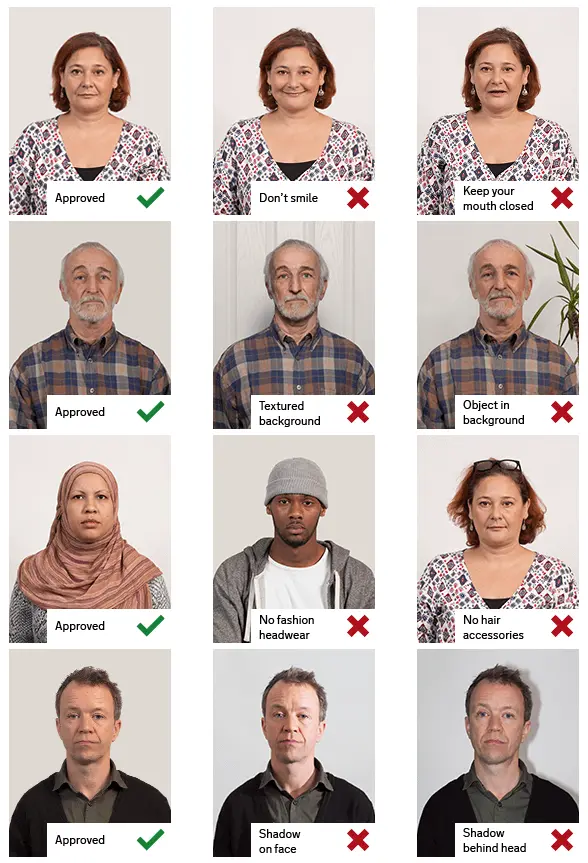
2.Pose & expression
- No hats unless worn daily for religious or medical reasons; nothing covering the face.
- No sunglasses or tinted glasses; eyes must be visible without glare from glasses.
- Print: 35 mm wide × 45 mm high (UK booth standard). Crown-to-chin in the print: 29–34 mm.
- Head and upper shoulders only; no other people or objects; clear contrast with the background.
- Face the camera; neutral expression with mouth closed; eyes open and visible. No tinted glasses; everyday glasses are OK if eyes show fully without glare.
- Head size in frame: Crown to chin must be 29–34 mm within the 45 mm print (about 64–76% of frame height from the top when your crown sits near the top of the crop).
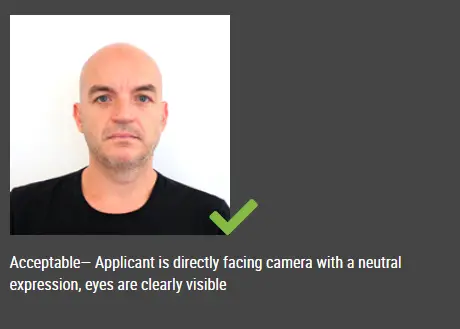
3.Attire & accessories
- No hair in front of your eyes; no head covering except religious or daily medical reasons; avoid red-eye.
4.Lighting & background
- Even lighting on face and background — no shadows behind you or on your face.
- Colour; sharp focus; plain cream or light grey background; no shadows on the face or behind you.
- Background (summary): Plain cream or light grey, evenly lit — no shadows on your face or behind you (Midlothian Council / UK travel pass).
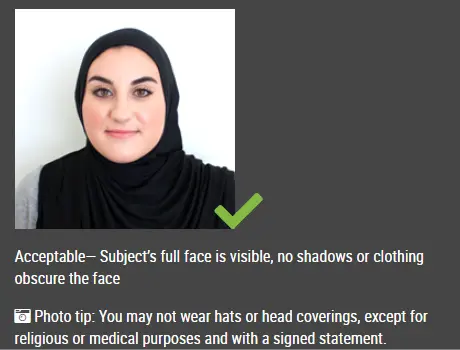
5.Children & infants
- Children must be alone in the picture; under 6, looking straight at the camera and a neutral expression are not always required.
- No toys or dummy (pacifier) in shot for child photos.
Visual guide
Below are official diagrams from Midlothian Council’s travel pass photo page (many UK issuers use the same 35 × 45 mm rules).
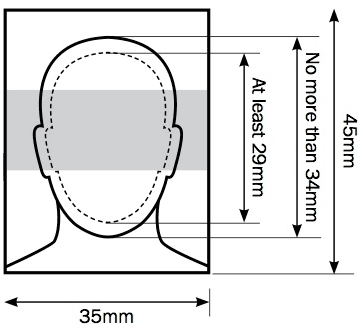
Composition (Do): head and upper shoulders only; crown-to-chin between 29 mm and 34 mm in the 45 mm print — about 65–75% of the photo height when the crown sits near the top.
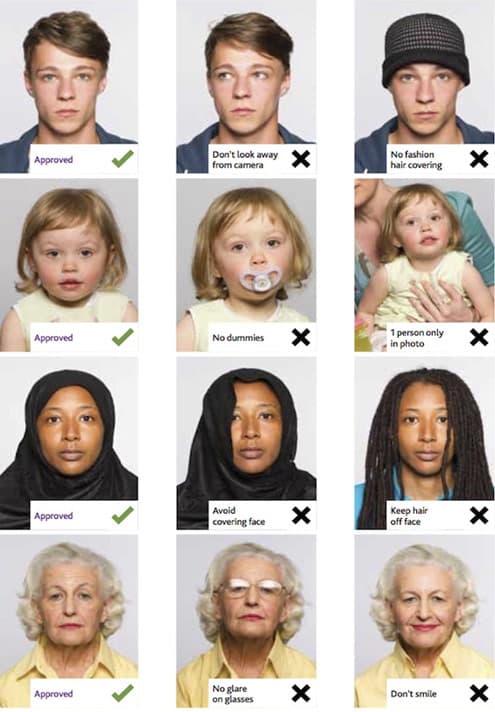
Official Do and Don’t panel: background must be plain cream or light grey with no shadows; keep a neutral face with eyes open (no tinted glasses or hair over the eyes).
How to make this photo
1.Step 1: Lighting and background
- —Stand about one metre from the camera. Face a large soft light (e.g. a window) so your face and background are evenly lit.
- —A plain wall works; cream or light grey is ideal — you can tidy or replace the background in the editor.
2.Step 2: Framing and composition
- —Head and upper shoulders only — leave a little space above the crown for the official 29–34 mm crown-to-chin band in the 45 mm tall print.
- —Use the cyan band in the crop: keep your chin between the two solid lines when your crown sits near the dashed top guide.
3.Step 3: Clothing, glasses, and hair
- —No hats except religious or medical headwear worn daily. Hair must not cover your eyes.
- —Remove tinted glasses. If you need everyday glasses, reduce glare so the full iris and pupil show.
4.Step 4: Expression, capture, and printing
- —Neutral expression; mouth closed; avoid smiling. Camera at eye height; look straight into the lens; avoid red-eye (soft or no flash).
- —Downloads are JPEG; we adjust quality toward the 50–250 KB range while keeping at least 450 × 600 px. For posted prints, use sharp, professional printing on plain white photographic paper with no border unless told otherwise.
Reference summary aligned with common third-party requirement listings. Always verify against the official embassy or visa center before you submit.