

Taiwan (台灣) — Passport
Taiwan (台灣) · Passport
Specifications
| Country | Taiwan (台灣) |
|---|---|
| Document type | Passport |
| Passport / visa picture size | Width: 35 mm, Height: 45 mm |
| Aspect ratio | 7:9 (35 × 45 mm) |
| Resolution (DPI) | 600 |
| Required file size (digital) | — |
| Head in photo | Head must be between 70 to 80 % of the photograph from the bottom of the chin to the top of the head |
| Background color | White — plain and evenly lit unless your issuer specifies a different tone. |
| Printable photo | Yes |
| Digital photo for online submission | Yes |
| Digital photo size (pixels) | Width: 826 px, Height: 1062 px |
| Photo paper type | matte |
Official Source
外交部領事事務局 (Bureau of Consular Affairs, Taiwan) — 護照規格FAQ
Bullets are grouped from this country’s requirement text and spec fields. If a topic has no matching lines in our data, we show common international-style guidance—always confirm with your issuer.
1.Photo basics & quality
- Final print size for this preset: 7:9 (35 × 45 mm).
- 外交部自94年7月1日起啟用新式護照用照片規格,該規格及標準與94年內政部全面換發國民身分證照片規格相同,最近6個月內所攝彩色,脫帽、未戴有色眼鏡,眼、鼻、口、臉、兩耳輪廓及特殊痣、胎記、疤痕等清晰、不遮蓋,相片不修改,足資辨識人貌,直4.5公分,橫3.5公分,人像自頭頂至下顎之長度不得小於3.2公分及超過3.6公分,詳列如下:
- 二、直4.5公分且橫3.5公分,以頭部及肩膀頂端近拍,使臉部佔據整張照片面積的 70~80%。
- 三、對焦需清晰且鮮明,高品質,無墨跡或摺痕。
- 四、眼睛正視相機鏡頭拍攝,自然地顯現出皮膚的色調,有合適的亮度及對比。
- 六、如照片是以數位相機拍攝,必須為高彩度而且以相紙沖(列)印。
- 八、眼睛必須張開且清晰可見,不能被頭髮遮蓋,呈現清楚的臉型輪廓,不能側向一 邊(似肖像畫形式)或傾斜,且臉型兩側、兩耳輪廓及特殊痣、胎記、疤痕需清 楚呈現,照片不修改。
- 十、光源需均勻而且不能有影子或閃光反射在臉部,不能有紅眼。
- (一)眼睛需清楚呈現,不能有閃光反射在眼鏡上,且不能佩戴有色眼鏡(請避免配 戴粗重的鏡架,配戴較輕巧之眼鏡)。
- 十二、因宗教因素須戴頭巾者,照片人貌之五官從下巴的底部至額頭的頂端及臉的兩 側輪廓,必須清楚呈現。
- 十三、照片必須單獨顯現當事人的影像(不能有椅背、玩具或其他人的影像),眼睛 正視相機鏡頭拍攝,無特殊表情且嘴巴合閉。
- Always confirm the latest rules with the official issuing authority or online application portal before you submit.
- Dimensions for this preset: 35 × 45 mm (7:9 (35 × 45 mm)).
- Suggested print resolution: 600 DPI (confirm with your issuer).
- Typical digital dimensions when specified: 826 × 1062 px (confirm upload requirements).
- A printable physical photo may be required for this document type (when applicable).
- Online submission with a digital file may be required (check the current application flow).
- Photo paper when printing: matte.
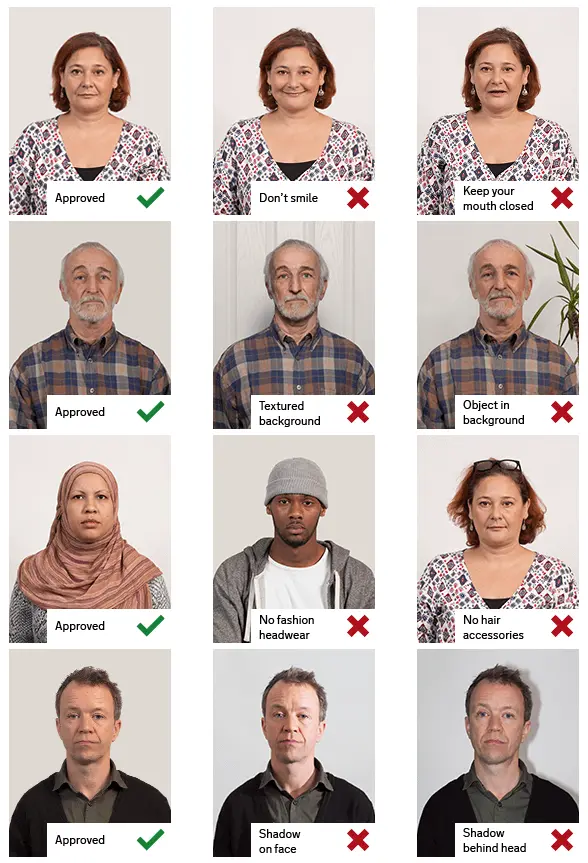
2.Pose & expression
- Head size in frame: Head must be between 70 to 80 % of the photograph from the bottom of the chin to the top of the head
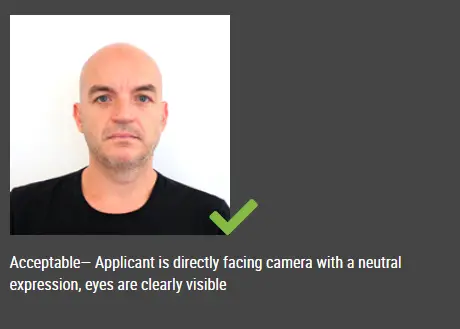
3.Attire & accessoriesInternational standards
- Everyday clothing; no uniform or uniform-like outfit unless your issuer allows it.
- Follow official rules for glasses, hats, and religious or medical head coverings—many passport programs require removing glasses.
- Keep the face unobstructed (hair off the eyes unless your authority says otherwise).
4.Lighting & background
- Background (summary): White — plain and evenly lit unless your issuer specifies a different tone.
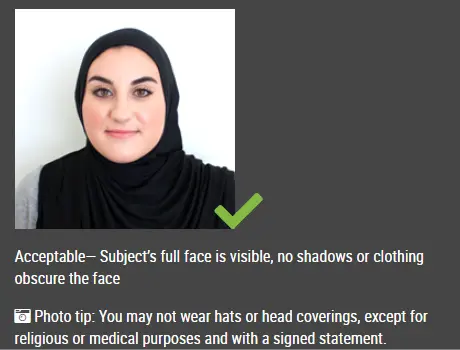
Visual guide
Illustrative reference photos served from a third-party CDN. Use only as informal guidance; follow your official instructions.

How an online passport photo generator typically works
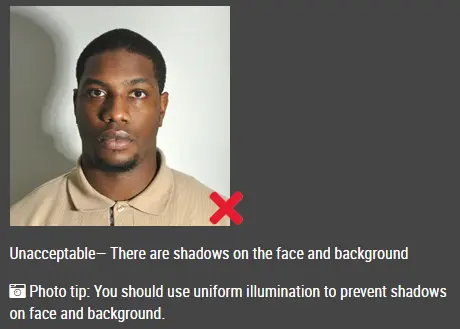
Avoid heavy shadows on the face and background
Even lighting and a clear, frontal face
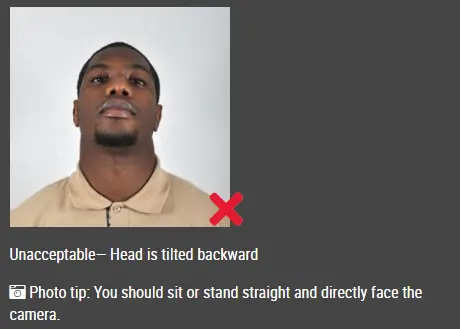
Head should not be tilted or turned away from the camera
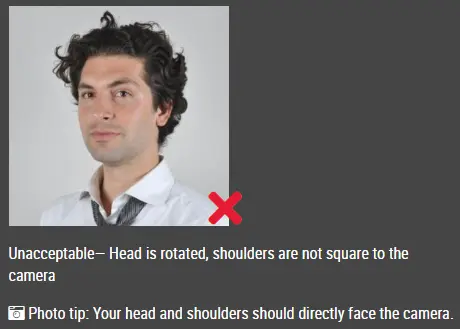
Keep the head straight; do not rotate the face
Face the camera straight on with shoulders visible
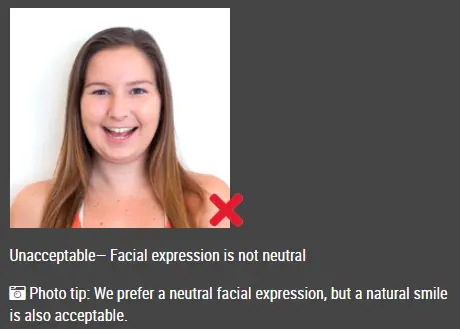
Avoid exaggerated smiles or an open mouth when a neutral look is required
Good and bad sizing / framing examples
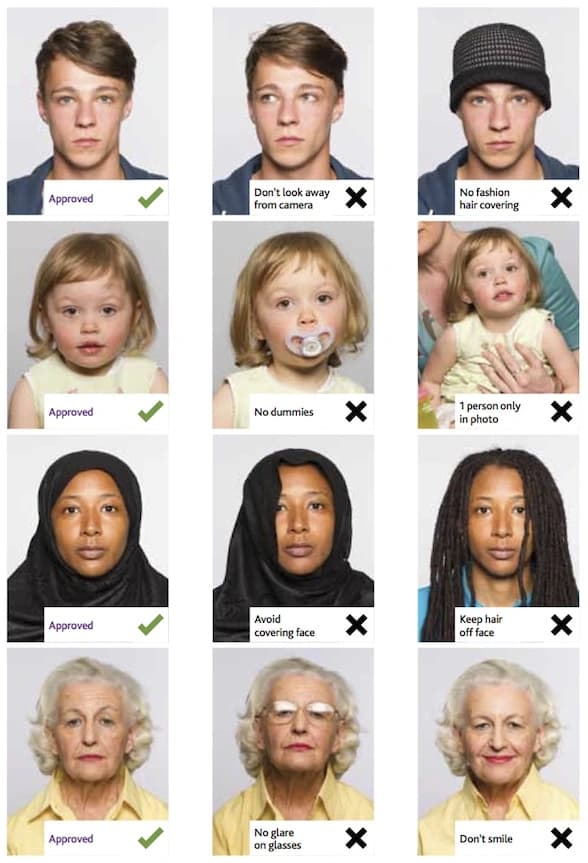
Printed photo strips (layout reference)
How to make this photo
1.Step 1: Use a digital camera or a smartphone
- —Find someone to take the photo for you and selfie photo is not acceptable for passport photo application. If you have a tripod, use it. A tripod will make it easier to keep the camera steady and level. The distance of the person to the camera should be around 1 meter.
2.Step 2: Find a venue with good lighting
- —When taking photo, you should face the light, such as a nice bright window or the door. This can provide even lighting to avoid shadows on the face and background. The face must be evenly lit. There should be no shadows and glares on the face.
- —Note: A simple wall is fine; you can tidy or replace the background while editing.
3.Step 3: Wear properly for your passport photo
- —Do not wear uniforms. Wear regular street clothes in your photo.
- —Do not wear eyeglasses. If you wear glasses, sunglasses, or tinted glasses, take them off for your passport photo.
- —Your face must still be fully visible. Don’t let your hair drape over your face and obscure your eyes. If you have very long bangs that cover your eyebrows, you should pin them back with bobby pins. It’s best if your ears show, as well, but that won’t cause your photo to be rejected.
- —No hats are allowed in passport photos unless it is religious headgear such as a headscarf or yarmulke that you wear every day.
4.Step 4: Pose for a passport
- —Look straight towards the camera with face straight on. Head should not be tilted or rotated.
- —Both ears showing or both edges of the face visible if hair covers the ears.
- —Shoulders should be visible, and there should be enough space around the head for cropping the photo.
- —Position the camera in the same height as the head.
5.Step 5: Have a neutral facial expression
- —You can smile in your passport photos, but the government prefers that you have a neutral facial expression.
- —Smiling or having your mouth open is usually not acceptable, especially under the new international passport rules.
- —Online Passport Photo Generator
Reference summary aligned with common third-party requirement listings. Always verify against the official embassy or visa center before you submit.